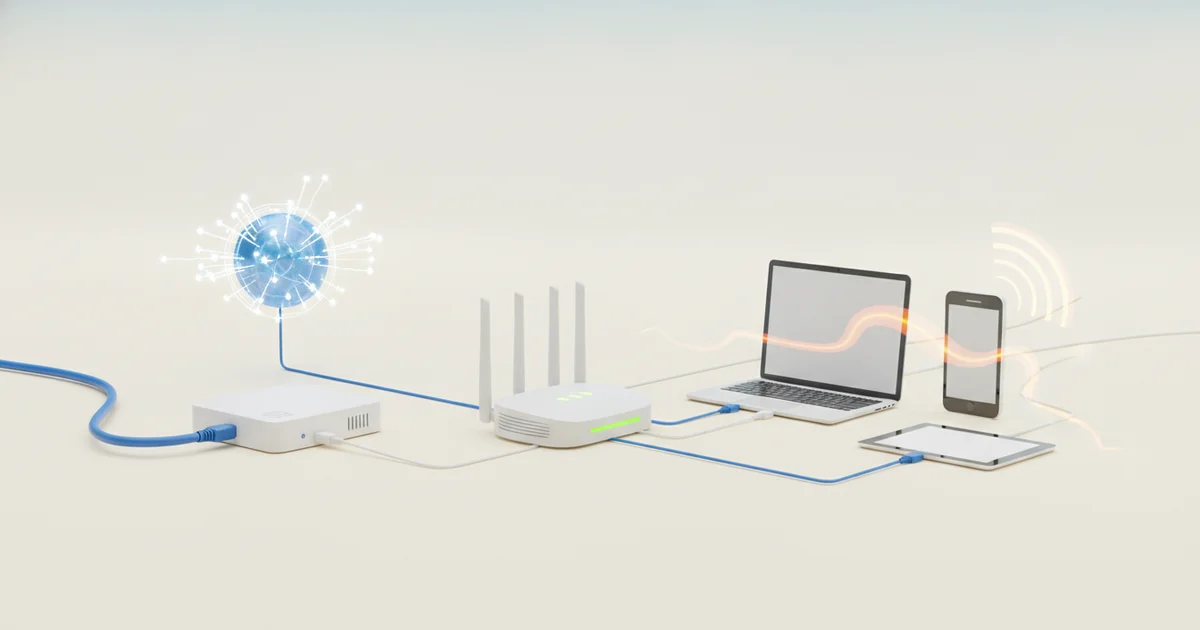
The Two Jobs That Get Your Home Online
Your home needs two separate jobs done to get online, and a modem handles one while a router handles the other. Swap them in your mind, and you’ll spend hours troubleshooting a problem you can’t actually solve.
The modem is your connection to the outside internet. It talks directly to your ISP — Comcast, AT&T, Spectrum, whoever sends you the bill — and translates the signal coming through your cable, fiber, or phone line into data your home equipment can use. Without it, your house has no relationship with the internet at all.
The router takes that connection and distributes it. Every device in your home — laptops, phones, smart TVs, thermostats — gets its own private IP address assigned by the router. The router decides which data packets go where, manages traffic between devices, and runs your local Wi-Fi network. It operates entirely inside your home.
Think of it this way: your home is an island. The modem is the port where cargo ships arrive from the wider world. The router is the warehouse and delivery network that moves those goods to every corner of the island. The port doesn’t know your island’s street layout. The warehouse doesn’t negotiate with the ships. Each does its job, and neither can do the other’s.
Conflating these two devices is the single biggest source of confusion when people try to fix or upgrade their home networks. A homeowner whose Wi-Fi drops in the back bedroom calls their ISP and gets told to reboot the modem — but the modem is working fine. The problem is the router’s range. A different homeowner upgrades to a faster internet plan and sees no speed improvement because their router is the bottleneck, not the modem. In both cases, not knowing which device does what leads to wasted time and wrong fixes.
ISPs have made this murkier by bundling both functions into a single unit called a gateway. That single box is convenient, but it has hidden the distinction from millions of consumers — which matters the moment something goes wrong or you want to take control of your own network.
The Gateway Device: Convenience With Hidden Trade-Offs
When your ISP ships you a single box and calls it a “gateway,” most people plug it in and move on. That box is quietly doing two separate jobs: translating your ISP’s signal into something your home network can use (the modem function) and directing traffic between all your connected devices (the router function). Most subscribers never register the distinction because the hardware gives no indication that two technologies are sharing one plastic shell.
That invisibility suits ISPs perfectly. Gateway devices are engineered around the provider’s priorities — remote diagnostics, firmware control, and network management — not around giving you the fastest or most configurable home network. Consumer-grade standalone routers from companies like Asus, Netgear, or TP-Link consistently offer more advanced features, better antenna hardware, and more frequent security updates than the generic gateways Comcast, AT&T, or Spectrum hand out. When an ISP controls the firmware, they decide what you can and cannot configure.
The financial side is just as consequential. Renting a gateway from your ISP typically costs between $10 and $15 per month. At $12 a month, that’s $144 a year — and most households carry the same device for five or more years, putting the total rental cost past $700. That figure rarely appears in the headline pricing ISPs advertise when signing up new customers. A capable modem and a solid standalone router can be purchased outright for $150 to $250 combined, meaning the hardware pays for itself within two years.
The bundled gateway isn’t without merit. Setup is faster, there’s a single point of contact for support calls, and the ISP guarantees compatibility. For low-demand households, that convenience is a reasonable trade. But for anyone running a home office, streaming on multiple devices, or simply wanting control over their own network security settings, accepting the gateway at face value means accepting a device built for the ISP’s convenience, not yours.
Why Separating Your Devices Can Be a Power Move
Running your modem and router as separate devices puts you in control of two independent upgrade paths. When Wi-Fi 7 routers hit the market, you can swap in a new unit without touching your ISP connection hardware. When your ISP rolls out a DOCSIS 3.1 modem update, you handle that side of the equation without discarding a perfectly good router. With a gateway, you lose that flexibility — one device ages out, and you replace everything at once.
The resilience argument is just as compelling. A gateway failure kills both your internet connection and your internal network simultaneously. With separate devices, a router crash leaves your modem intact, and vice versa. Diagnosing the problem is faster, and replacing a single failed unit costs less than swapping out a combined device.
The feature gap between ISP-issued gateways and purpose-built routers is significant. Routers from manufacturers like Asus, Netgear, and TP-Link ship with granular parental controls that let you set per-device schedules and content filters — tools most ISP gateways don’t offer at all. Built-in VPN server support lets you route traffic securely when you’re away from home without subscribing to a third-party service. Quality of Service controls let you prioritise bandwidth for video calls or gaming traffic over background downloads, something ISP firmware rarely exposes to users.
ISP gateways are designed to handle the average household at minimum operational cost to the provider. They are not designed to give you maximum performance, security depth, or network visibility. A standalone router running firmware like Asus’s AsusWRT or open-source options like OpenWrt hands you DNS-level ad blocking, detailed traffic logs, and VLAN segmentation — capabilities that matter as the number of connected devices in a typical home climbs past two dozen. Separating the devices isn’t a technical exercise for enthusiasts. It’s a practical decision that pays off every time you troubleshoot a problem, upgrade a component, or lock down your network.
The Missing Context: Not All Connections Are Equal
Most buying guides treat modems as a single category of device, but the modem you need depends entirely on how your ISP delivers internet to your home. Cable connections use DOCSIS-based modems, which communicate over coaxial lines. DSL connections require a completely different modem that operates over copper telephone infrastructure. These two device types are physically and technically incompatible — you cannot use a DOCSIS cable modem on a DSL line and expect anything to happen.
This compatibility requirement is the piece of context that most mainstream coverage skips entirely. Articles recommend specific modem models without first establishing which connection type the reader actually has. Someone on a Comcast cable plan and someone on an AT&T DSL plan need fundamentally different hardware, and conflating the two leads directly to returned purchases, wasted time, and technician call fees.
Fibre connections complicate the picture further — and fibre rollout is accelerating. In the United States alone, fibre passed more than 50 million homes as of 2024. On a fibre connection, there is no modem in the traditional sense. Instead, the ISP installs an Optical Network Terminal, or ONT, which converts the optical signal from the fibre line into an ethernet signal your router can use. The ONT is almost always ISP-supplied and non-negotiable — you cannot buy a third-party replacement. This means fibre customers who research “modem upgrades” are solving the wrong problem entirely. Their job is to connect a quality standalone router to the ONT’s ethernet port and stop there.
Buying the wrong modem for your connection type is not a minor inconvenience. A DOCSIS 3.1 modem from Motorola or ARRIS can cost $150 or more. Purchase one for a connection type it doesn’t support, and that money is gone until you complete the return. Understanding the two-device model — and specifically which half applies to your situation — is the only way to avoid that outcome.
How to Audit What You Actually Have at Home
Start by counting the boxes your ISP installed. One box means you have a gateway — a combined modem and router that handles both your connection to the internet and the distribution of that connection across your devices. Two boxes mean you have separate units, and the one plugged directly into the coaxial or phone line is your modem, while the one your devices connect to is your router.
If counting boxes still leaves you uncertain, check the ports. A standalone modem has a coaxial or DSL input on one side and a single Ethernet output on the other — that’s it. A standalone router has multiple Ethernet ports, no coaxial input, and usually external antennas. A gateway has both the coaxial or phone-line input and multiple Ethernet outputs on the same device, sometimes alongside antenna arrays.
Check the label on the bottom or back of each device. ISPs brand their gateways with model names like Xfinity’s XB8, AT&T’s BGW320, or Spectrum’s SAX1V1R — a quick search of any of these model numbers confirms whether you’re holding a gateway. The label also tells you the manufacturer, which matters when you look up compatible third-party replacements.
Once you know your setup, three things become actionable. First, you can make a real upgrade decision — a gateway limits your router options, while a separate modem lets you swap in any compatible router without ISP approval. Second, you can troubleshoot accurately — blaming the router for slow speeds is pointless if you have a gateway and the problem is signal degradation on the modem side. Third, you can calculate whether you’re losing money. Comcast charges $15 per month to rent an XB8 gateway. That’s $180 a year. A comparable third-party modem-router combination costs under $200 upfront and pays for itself in 13 months.
ISPs do not walk customers through this audit during installation. The technician connects the hardware and leaves. Taking ten minutes to identify exactly what you have gives you the baseline every subsequent network decision depends on.
What This Means for You Right Now
The average American household now runs more than 20 connected devices — laptops, phones, smart speakers, thermostats, security cameras, video doorbells — and that number keeps climbing. Remote work alone added video calls, cloud backups, and VPN traffic to networks that were once handling little more than Netflix and casual browsing. All of that load is managed at the router layer, not the modem. If you don’t know which box is doing that work, you can’t make informed decisions about upgrading it.
That distinction has real money attached to it. ISPs charge anywhere from $10 to $20 per month to rent a gateway device. Over three years, that’s up to $720 for hardware you don’t own and can’t meaningfully control. Customers who separate their modem from their router — buying a compatible modem outright and pairing it with a router of their choice — break out of that cycle entirely.
The router market is also moving fast in ways that gateway users simply miss. Wi-Fi 7, the latest wireless standard, delivers theoretical speeds above 40 Gbps and dramatically reduces latency for real-time applications like video calls and cloud gaming. Mesh systems from companies like Eero, Orbi, and Google Nest eliminate dead zones by distributing the routing function across multiple nodes. Newer routers from Asus and TP-Link now include AI-driven traffic prioritization that automatically gives bandwidth to your work laptop during business hours. None of these innovations are available through a standard ISP-issued gateway, which typically ships with last-generation Wi-Fi 6 or older hardware and receives infrequent firmware updates.
The single most useful thing you can do for your home network is identify which physical box connects to your ISP’s infrastructure and which one distributes that connection to your devices. Everything downstream from that knowledge — whether you’re troubleshooting a dead zone, negotiating with your ISP, cutting a monthly rental fee, or upgrading to a mesh system — depends on it. You can’t fix what you haven’t correctly identified.